An ERP developer configures a purchase workflow. A user creates a purchase order, the warehouse records the receipt of goods, and the finance team posts the supplier invoice. Everything works as expected from a technical perspective.
But what happens to the company's financial records when that invoice is posted?
Which accounts change? Why does one account increase while another also increases? How does this transaction eventually appear in the company's financial statements?
These questions connect ERP functionality with accounting.
You do not need an accounting degree to understand this connection. However, if you develop, configure, or support ERP systems, understanding the financial logic behind business transactions will help you understand what the system is supposed to do.
Let's start with a simple business transaction and build our understanding from the ground up.
1. Start With a Business Transaction
Imagine a company purchases a laptop for PKR 100,000. The laptop is intended for office use, and the company will pay the supplier next month.
From a business perspective, three things have happened:
· The company has received a laptop.
· The company now owes PKR 100,000 to the supplier.
· The company has not paid any cash yet.
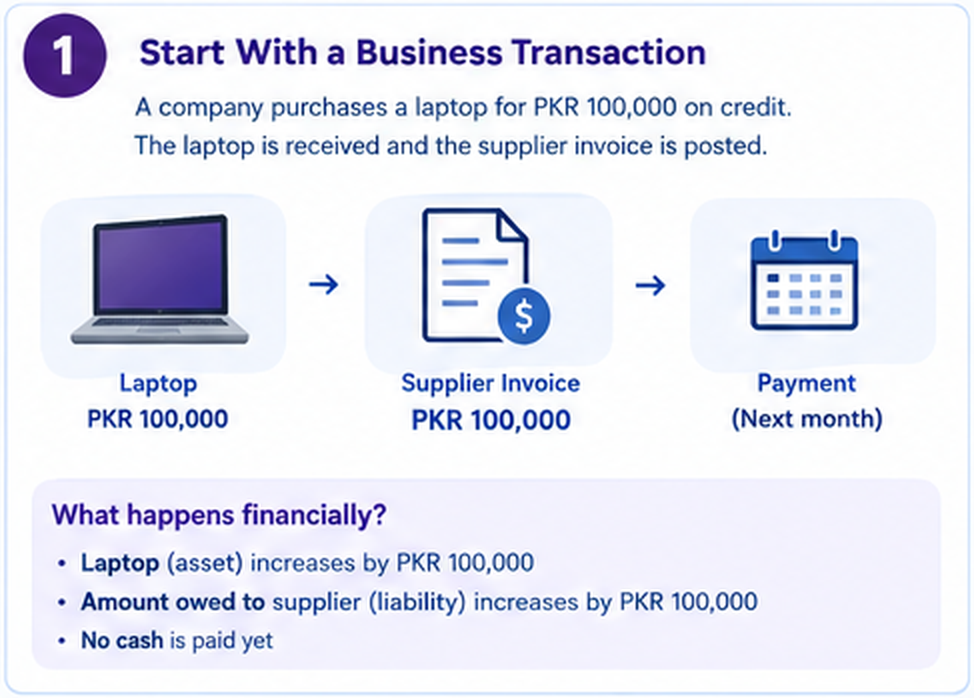
Now consider the same transaction from an accounting perspective.
The laptop is something the company owns and uses to support its operations. Assuming it meets the company's capitalization policy, it is recorded as an asset.
The unpaid amount is a liability because the company has an obligation to pay the supplier.
The transaction therefore increases both the company's assets and its liabilities by PKR 100,000.
What changed financially?
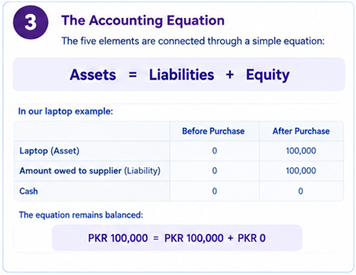
This is the first important concept: a business transaction can change several financial accounts, even when no money has changed hands.
For an ERP professional, this explains why recording a purchase is not necessarily the same as recording a payment.
2. Understand the Five Basic Elements of Accounting
To understand how accounting works, you first need to understand the five basic elements used to classify financial information.
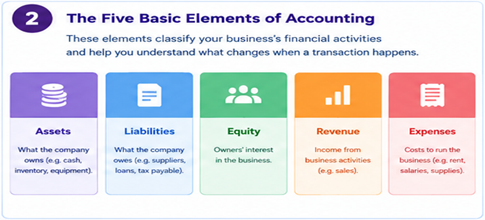
Assets
Assets are resources a business owns or controls that provide economic benefits.
Examples include:
· Cash and bank balances
· Inventory
· Computers and office equipment
· Vehicles and machinery
· Amounts customers owe the business
In an ERP system, these items may be represented through accounts, inventory records, fixed asset records, and customer balances.
Liabilities
Liabilities are obligations the business owes to other parties.
Examples include:
· Amounts owed to suppliers
· Bank loans
· Taxes payable
· Unpaid employee-related obligations
When a supplier delivers goods and the company records an unpaid invoice, the amount owed is generally recorded as accounts payable.
Equity
Equity represents the owners' residual interest in the business after liabilities are deducted from assets.
For example, if a business has assets of PKR 1,000,000 and liabilities of PKR 300,000, its equity is PKR 700,000, assuming no other adjustments are required.
Equity can change through owner contributions, profits, losses, and distributions.
Revenue
Revenue is income earned from the business's ordinary activities, such as selling products or providing services.
For example, when a company sells goods to a customer on credit, it may recognise revenue and record an amount receivable from the customer, depending on when the applicable revenue recognition requirements are satisfied.
Revenue is not necessarily the same as cash received.
Expenses
Expenses represent the costs incurred in earning revenue or operating the business.
Examples include salaries, rent, electricity, and office supplies.
An expense reduces profit and ultimately affects equity. However, not every purchase is immediately recorded as an expense. Equipment and inventory, for example, may initially be recorded as assets.
This distinction matters in ERP systems because the type of item being purchased can determine which account is affected.
3. The Accounting Equation: Why the Numbers Must Balance
The five elements are connected through a fundamental accounting relationship:
Assets = Liabilities + Equity
This is known as the accounting equation.
It means that the resources a business controls are financed either by obligations to others or by the owners' interest in the business.
Return to our laptop example.
The company acquires an asset worth PKR 100,000 and incurs a liability of PKR 100,000.
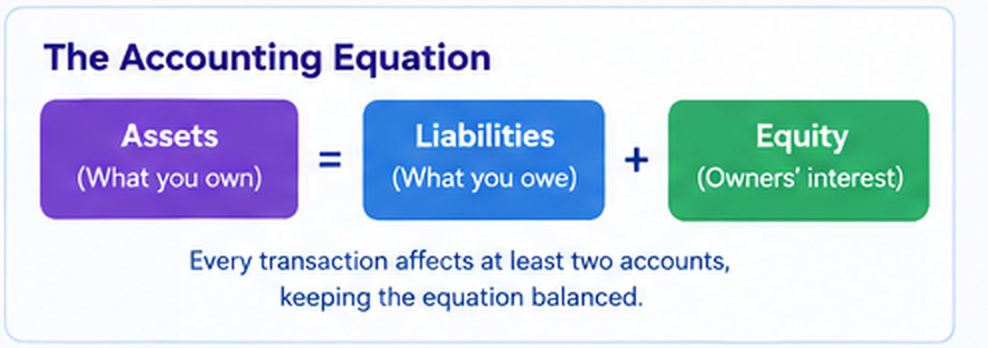
The equation remains balanced.
Now imagine the company pays the supplier in full the following month.
The company no longer owes the supplier PKR 100,000, and its bank balance decreases by PKR 100,000. The laptop remains an asset.
The result is:
· Assets decrease by PKR 100,000 through the reduction in bank balance.
· Liabilities decrease by PKR 100,000 through the settlement of accounts payable.
· The laptop remains recorded as an asset, subject to depreciation and other applicable accounting adjustments over time.
The equation remains balanced because both assets and liabilities have decreased by the same amount.
Why should an ERP professional care?
The accounting equation helps explain the financial impact of transactions. It provides a foundation for understanding why a transaction can affect multiple accounts and why the accounting records must remain consistent.
4. How Does Accounting Record These Changes?
So far, we have discussed what happens financially. The next question is how the business records those changes.
Accounting uses a system called double-entry bookkeeping.
Under this system, each transaction is recorded through at least two corresponding account entries. Total debits must equal total credits for each balanced journal entry.
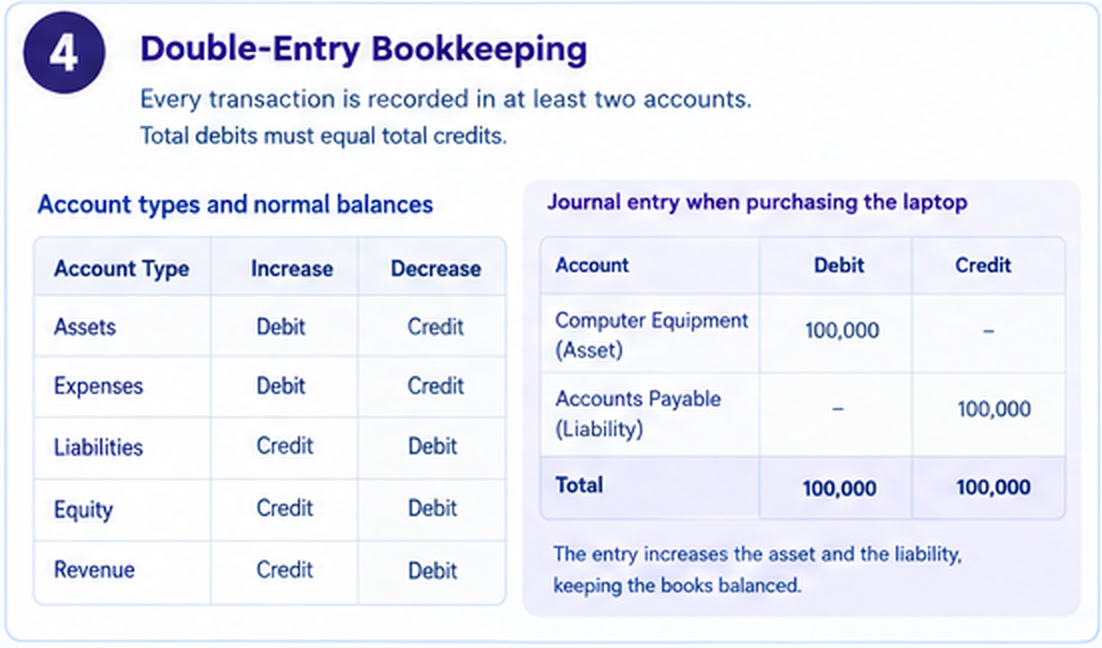
To understand this, you need to know three terms.
Account: A record used to track a particular type of financial activity, such as bank balances, equipment, revenue, or amounts owed to suppliers.
Debit: An entry recorded on the left side of an account.
Credit: An entry recorded on the right side of an account.
Debit does not automatically mean an increase, and credit does not automatically mean a decrease. Their effects depend on the type of account.
These are the basic rules for normal account balances. More advanced transactions may involve additional considerations.
Apply these rules to the laptop purchase
The company purchases the laptop for PKR 100,000 on credit.
We already know that:
· The equipment asset increases by PKR 100,000.
· The amount owed to the supplier increases by PKR 100,000.
According to the rules above, an increase in an asset is recorded as a debit, while an increase in a liability is recorded as a credit.
The resulting journal entry is:
|
Account |
Debit |
Credit |
|
Computer Equipment |
PKR 100,000 |
— |
|
Accounts Payable |
— |
PKR 100,000 |
|
Total |
PKR 100,000 |
PKR 100,000 |
The entry balances because the total debit equals the total credit.
Notice that no bank account is involved in this entry. The company has received the equipment, but it has not yet paid the supplier.
This is why understanding the business transaction first makes accounting entries easier to understand. The entries are simply the accounting representation of what happened financially.
What happens when the company pays the supplier?
When the company pays PKR 100,000 from its bank account, the equipment does not need to be recorded again. It has already been recognised.
Instead, the payment settles the outstanding liability and reduces the bank balance.
|
Account |
Debit |
Credit |
|
Accounts Payable |
PKR 100,000 |
— |
|
Bank |
— |
PKR 100,000 |
|
Total |
PKR 100,000 |
PKR 100,000 |
Accounts payable decreases through a debit, and the bank asset decreases through a credit.
The transaction is now understandable from both the business and accounting perspectives.
5. How Does an ERP System Use This Accounting Logic?
Now let's connect these concepts to an actual ERP workflow.
Consider a typical purchase-to-pay process.
Step 1: Purchase order
The purchasing team creates a purchase order for the laptop.
The order records what the company intends to purchase, from whom, and at what price. In many ERP configurations, creating a purchase order does not itself create a financial journal entry in the general ledger.
Step 2: Goods receipt
The warehouse records that the laptop has been received.
This updates the purchasing and inventory or receipt records. The accounting impact depends on the ERP's configuration and the company's process. Some systems recognise receipt-related accounting entries before the supplier invoice is posted.
Step 3: Supplier invoice
The finance team receives and verifies the supplier invoice.
When the invoice is posted, the ERP system applies its configured accounting rules. In our simplified example, the system records a debit to Computer Equipment and a credit to Accounts Payable.
Step 4: Supplier payment
When the payment is processed and recorded, the system reduces accounts payable and reduces the bank balance.
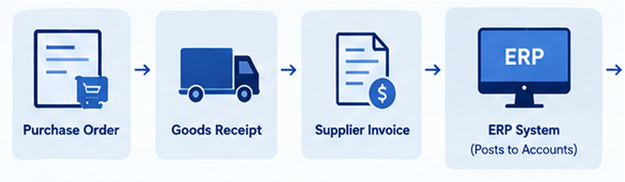
The key point is that these stages represent different business events. They do not necessarily create the same accounting entries, and the exact behavior depends on the ERP platform and configuration.
Where does the ERP system get the account information?
ERP systems commonly use configured accounting rules and master data to determine which accounts are affected by transactions.
For example, the system may use:
· The product or item configuration
· The transaction type
· The company or business unit
· The supplier's settings
· The applicable tax configuration
· The chart of accounts and posting rules
If a laptop purchase is mapped to an expense account instead of an equipment asset account, the system may technically post the transaction successfully while producing a financial classification that does not meet the company's accounting requirements.
The correct treatment depends on the nature of the purchase and the company's accounting policy.
This illustrates an important distinction: a transaction can process successfully in an ERP system without necessarily being accounted for correctly.
The system follows its configured rules. Understanding accounting helps determine whether those rules reflect the intended business treatment.
6. Where Do These Records Appear in Financial Reports?
Accounting transactions eventually contribute to the company's financial reports.
Two important reports are the balance sheet and the profit and loss statement.
Balance sheet
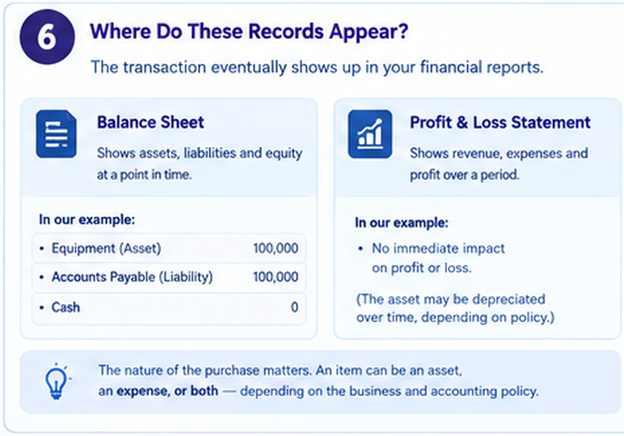
The balance sheet shows the company's assets, liabilities, and equity at a particular date.
In our example, the laptop is recorded as an asset, and the unpaid supplier invoice is recorded as a liability.
After the supplier is paid, the liability is settled and the bank balance decreases. The equipment remains an asset, although depreciation and other adjustments may affect its carrying value over time.
Profit and loss statement
The profit and loss statement reports revenue, expenses, and the resulting profit or loss over a period.
Our laptop purchase is not automatically an expense simply because the company paid for it or received an invoice. If it qualifies for recognition as a fixed asset under the applicable accounting policy, its cost is generally recognized as an asset first and expensed over time through depreciation.
By contrast, a small office supply purchase that qualifies as an immediate expense may be recorded directly as an expense.
This distinction explains why the nature of a transaction matters when configuring ERP account mappings.
The same amount of money can produce different accounting outcomes depending on what the company has purchased and how that purchase should be treated.
What You Should Take Away
Accounting is a way of recording and organising the financial effects of business activities.
For an ERP professional, the learning process begins by understanding what happened in the business transaction, identifying which financial elements changed, and learning how those changes are represented in the accounting records.
The most important concepts from this article are:
· Business transactions can affect multiple accounts, even when no cash changes hands.
· Assets, liabilities, equity, revenue, and expenses classify different aspects of a company's financial activity.
· The accounting equation connects assets, liabilities, and equity.
· Double-entry bookkeeping records transactions using debits and credits.
· ERP systems apply configured rules to turn business transactions into accounting records.
You do not need to master every accounting topic before working with an ERP system. Start by understanding the financial logic behind common transactions, then connect that knowledge to the modules and workflows you support.
Once you understand how accounting works, concepts such as automatic journal entries, account mapping, reconciliations, and financial reporting become much easier to follow.
At FacileMind, we help ERP professionals and implementation partners bridge the gap between accounting knowledge and ERP functionality. Connect with us to explore our accounting support and ERP functional services.